> For the complete documentation index, see [llms.txt](https://aisviz.gitbook.io/documentation/llms.txt). Markdown versions of documentation pages are available by appending `.md` to page URLs; this page is available as [Markdown](https://aisviz.gitbook.io/documentation/tutorials/decimation-with-aisdb.md).
# Decimation with AISdb
Reduce AIS track density with AISdb's Visvalingam-Whyatt line simplification, through TrackGen's decimate argument or direct calls.
Automatic Identification System (AIS) data provides a wealth of insight into maritime activity, including vessel movements and traffic patterns. However, the raw volume, often millions or even billions of GPS position reports, can be overwhelming. Processing and visualizing this data directly is computationally expensive, slow, and hard to interpret.
This is where AISdb's **decimation** comes in. It helps you reduce data clutter so you can focus on the positions that actually matter to your analysis.
## What is Decimation in the Context of AIS Tracks?
Decimation, in simple terms, means reducing the number of data points. When applied to AIS tracks, it selectively removes GPS points from a vessel's trajectory while preserving its overall shape and key characteristics. Rather than processing every recorded position, decimation algorithms identify and retain the most relevant points, optimizing data efficiency without significant loss of accuracy.
Think of it like simplifying a drawing. Instead of using thousands of tiny dots to represent a complex image, you can use fewer, strategically chosen points to capture its essence. Decimation does the same for a vessel's path, trimming the point count while keeping the core trajectory intact, which makes downstream analysis and visualization more efficient.
## Why Decimate AIS Data?
There are several key benefits to using decimation when working with AIS data.
1. **Improved Performance and Efficiency**. Reducing the number of data points dramatically decreases the computational load, enabling faster analyses, quicker visualizations, and a more effective workflow, especially when dealing with large datasets.
2. **Clearer Visualizations**. Dense tracks clutter visualizations and make the data hard to interpret. Decimation simplifies the tracks, emphasizing significant movements and patterns for more intuitive analysis.
3. **Noise Reduction**. Decimation is not designed as a noise removal technique, but it can help smooth out minor inaccuracies and high-frequency fluctuations in raw GPS data, which is useful for focusing on broader trends and vessel movements.
## AISdb and `TrackGen(..., decimate=...)`
In AISdb, decimation is exposed through the `decimate` argument of `aisdb.track_gen.TrackGen()`. `TrackGen()` has no default for this argument, so every call must pass `decimate` explicitly, either `True`, `False`, or a specific precision value.
* `decimate=False` skips simplification entirely. Every position returned by your query is kept.
* `decimate=True` applies the Rust-native `simplify_linestring_idx(x, y, precision)` function with a precision of `0.0001`.
* `decimate=` applies the same function using your chosen precision instead of the `0.0001` default, giving you direct control over how aggressively each track is simplified.
`simplify_linestring_idx()` is implemented in AISdb's Rust extension (built with PyO3 and exposed via `aisdb.track_gen.simplify_linestring_idx`) and uses the [**Visvalingam-Whyatt algorithm**](https://en.wikipedia.org/wiki/Visvalingam%E2%80%93Whyatt_algorithm) to simplify vessel tracks while preserving key trajectory details.
One detail is worth knowing when you inspect the output. `TrackGen()` always segments a track wherever consecutive longitude values jump by more than 300 degrees, independent of the `decimate` setting. That split handles vessels crossing the antimeridian, where longitude wraps from close to +180 to close to -180, and prevents a single track from being drawn as a straight line across the entire globe.
## How the Visvalingam-Whyatt Algorithm Works
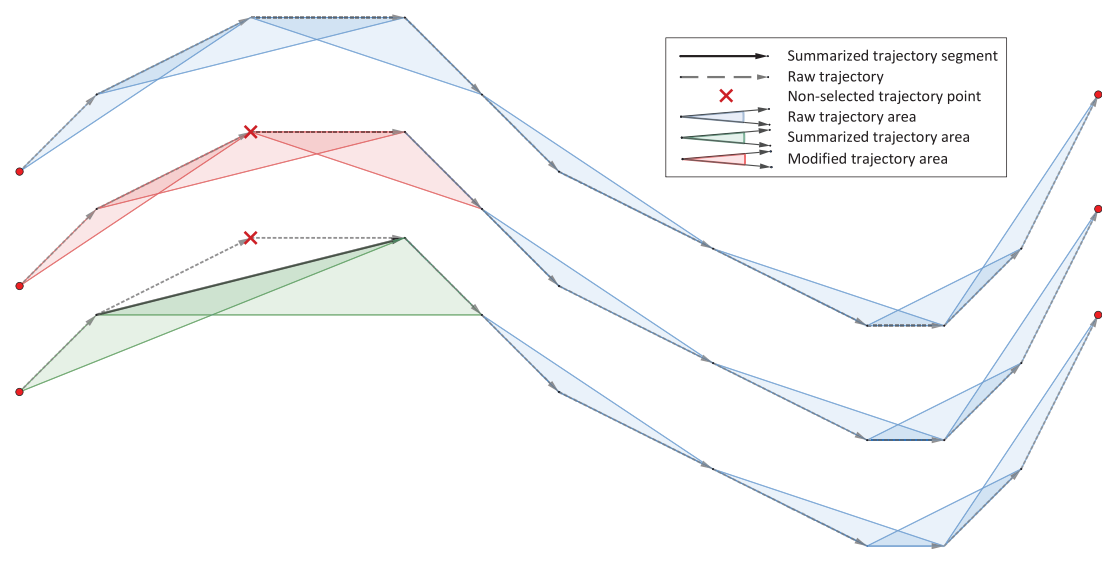
The Visvalingam-Whyatt algorithm is a line simplification method. It works by removing points that contribute the least to the overall shape of the line. Here is the basic idea.
* The algorithm measures the importance of a point by calculating the area of the triangle formed by that point and its adjacent points.
* Points on relatively straight segments form smaller triangles, meaning they're less important in defining the shape.
* Points at curves and corners form larger triangles, signaling that they're crucial for maintaining the line's characteristic form.
The algorithm iteratively removes the points with the smallest triangle areas until the desired level of simplification is reached, controlled by the `precision` value. In AISdb, this process is triggered through the `decimate` parameter of `TrackGen()`, or by calling `simplify_linestring_idx()` directly if you want to decide precision on a track-by-track basis.
### Using `TrackGen(..., decimate=True)` with AISdb Tracks
Below is a working example that queries a bounding box and time range from a SQLite database, then generates decimated tracks:
{% code title="decimate\_trackgen.py" lineNumbers="true" %}
```python
import aisdb
from datetime import datetime
dbpath = 'your_ais_database.db'
with aisdb.SQLiteDBConn(dbpath=dbpath) as dbconn:
qry = aisdb.DBQuery(
dbconn=dbconn,
start=datetime(2023, 1, 1), end=datetime(2023, 1, 2), # time range
xmin=-10, xmax=0, ymin=40, ymax=50, # bounding box
callback=aisdb.database.sqlfcn_callbacks.in_validmmsi_bbox,
)
rowgen = qry.gen_qry()
decimated_tracks = aisdb.track_gen.TrackGen(rowgen, decimate=True)
for track in decimated_tracks:
print(f"MMSI: {track['mmsi']}, points: {track['lon'].size}")
```
{% endcode %}
```
MMSI: 316001234, points: 41
MMSI: 316005678, points: 118
MMSI: 366912340, points: 27
```
The exact MMSIs and point counts depend on which vessels fall inside your bounding box and time range, so treat the numbers above as illustrative rather than something to match.
`TrackGen()` is a generator, so nothing is computed until you iterate over it. Each yielded `track` is a dictionary of NumPy arrays (`lon`, `lat`, `time`, `sog`, `cog`, and more) plus scalar static fields such as `mmsi`.
## Using `simplify_linestring_idx()` Directly
If you need finer control, for example applying different precision values to different tracks, call `simplify_linestring_idx()` yourself after generating undecimated tracks:
{% code title="simplify\_linestring\_idx.py" lineNumbers="true" %}
```python
import aisdb
from datetime import datetime
dbpath = 'your_ais_database.db'
with aisdb.SQLiteDBConn(dbpath=dbpath) as dbconn:
qry = aisdb.DBQuery(
dbconn=dbconn,
start=datetime(2023, 1, 1), end=datetime(2023, 1, 2),
xmin=-10, xmax=0, ymin=40, ymax=50,
callback=aisdb.database.sqlfcn_callbacks.in_validmmsi_bbox,
)
rowgen = qry.gen_qry()
tracks = aisdb.track_gen.TrackGen(rowgen, decimate=False) # keep every point
simplified_tracks = []
for track in tracks:
if track['lon'].size > 2: # simplification needs at least 3 points
idx = aisdb.track_gen.simplify_linestring_idx(
track['lon'], track['lat'], precision=0.01
)
simplified_track = dict(
**{k: track[k] for k in track['static']},
**{k: track[k][idx] for k in track['dynamic']},
static=track['static'],
dynamic=track['dynamic'],
)
simplified_tracks.append(simplified_track)
else:
simplified_tracks.append(track) # too short to simplify further
for track in simplified_tracks:
print(f"MMSI: {track['mmsi']}, points: {track['lon'].size}")
```
{% endcode %}
`simplify_linestring_idx(x, y, precision)` takes the longitude and latitude arrays and returns the indices of the points to keep. Indexing every array in `track['dynamic']` with that result, rather than just `lon`/`lat`/`time`, keeps `sog`, `cog`, and the other dynamic fields aligned with the simplified positions.
### Illustration of Decimation
### Key Parameters and Usage Notes
* **Precision.** Controls the level of simplification passed to `simplify_linestring_idx()`. A smaller value (e.g., `0.0001`, the default used when `decimate=True`) keeps more points and higher fidelity, while a larger value (e.g., `0.01`) simplifies the track further, keeping fewer points.
* **x, y.** The `lon` and `lat` NumPy arrays produced by `TrackGen()` for a single track.
* **TrackGen integration.** Passing `decimate=True` (or a float) to `aisdb.track_gen.TrackGen()` applies `simplify_linestring_idx()` automatically to each track as it is generated. Calling `simplify_linestring_idx()` yourself, after `decimate=False`, is only necessary when you want per-track control over precision.
* **Iterative refinement.** Decimation is often an iterative process. Visualize the decimated tracks, assess the level of simplification, and adjust `precision` to balance simplification against data fidelity.
## Conclusion
Decimation is a powerful tool for simplifying and decluttering AIS data. With the `decimate` argument of `TrackGen()` and, when you need more control, direct calls to `simplify_linestring_idx()`, AISdb lets you process data more efficiently, build clearer visualizations, and get to insights faster. Experiment with different precision values and see how much detail you can strip away before it starts to matter for your analysis.
## References
1. Amigo D, Sánchez Pedroche D, García J, Molina JM. Review and classification of trajectory summarisation algorithms: From compression to segmentation. International Journal of Distributed Sensor Networks. 2021;17(10). doi:[10.1177/15501477211050729](https://doi.org/10.1177/15501477211050729)
---
# Agent Instructions
This documentation is published with GitBook. GitBook is the documentation platform designed so that both humans and AI agents can read, navigate, and reason over technical content effectively. Learn more at gitbook.com.
## Querying This Documentation
If you need additional information that is not directly available in this page, you can query the documentation by asking a question.
Perform an HTTP GET request on the following URL with the `ask` and `goal` query parameters:
```
GET https://aisviz.gitbook.io/documentation/tutorials/decimation-with-aisdb.md?ask=&goal=
```
`ask` is the immediate question: it should be specific, self-contained, and written in natural language.
`goal` is what the user is ultimately trying to achieve, the reason they need the answer. Sharing it helps GitBook give you a better, more relevant answer. A goal is most helpful when it describes the outcome the user wants rather than restating the question. For example, with `ask=how do I create an API token`, a goal like `automate deployments from our CI pipeline` lets GitBook tailor the answer to that use case.
The response will contain a direct answer to the question and relevant excerpts and sources from the documentation.
Use this mechanism when the answer is not explicitly present in the current page, you need clarification or additional context, or you want to retrieve related documentation sections.