seq2seq in PyTorch

Sequence to Sequence using Torch

Vessel trajectories are a type of geospatial temporal data derived from AIS (Automatic Identification System) signals. In this tutorial, we will go over the most common Machine Learning Library to process and model AIS trajectory data.

We will begin with PyTorch, a widely used deep learning library designed for building and training neural networks. Specifically, we will implement a recurrent neural network using LSTM (Long Short-Term Memory) to model sequential patterns in vessel movements.

We will utilize AISdb, a dedicated framework for querying, filtering, and preprocessing vessel trajectory data, to streamline data preparation for machine learning workflows.

Setting Up Our Tools

First, let's import the libraries we'll be using throughout this tutorial. Our main tools will be NumPy and PyTorch, along with a few other standard libraries for data handling, model building, and visualization.

  • pandas, numpy: for handling tables and arrays

  • torch: for building and training deep learning models

  • sklearn: for data splitting and evaluation utilities

  • matplotlib: for visualizing model performance and outputs

import io
import json
import random
from collections import defaultdict
from datetime import datetime, timedelta

import matplotlib.pyplot as plt
import numpy as np
import pyproj
import torch
import torch.nn as nn
import torch.nn.functional as F
from sklearn.model_selection import train_test_split
from sklearn.preprocessing import StandardScaler, MinMaxScaler, RobustScaler
from torch import nn
from torch.utils.data import DataLoader, TensorDataset

import joblib
import aisdb
from aisdb import DBConn, database
from aisdb.database import sqlfcn_callbacks
from aisdb.database.sqlfcn_callbacks import in_timerange
from aisdb.database.dbconn import PostgresDBConn
from aisdb.track_gen import TrackGen

import cartopy.crs as ccrs
import cartopy.feature as cfeature

Assuming you have the database ready, you can replace the file path and establish a connection.

We have processed a sample SQLite database containing open-source AIS data from Marine Cadastre, covering January to March near Maine, United States.

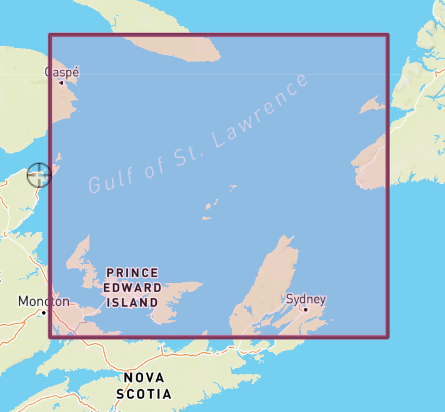
To generate the query using AISdb, we use the DBQuery function. All you have to change here is the DB_CONNECTION , START_DATE, END_DATE and the bounding coordinates.

Sample coordinates look like this on the map:

We use pyproj for the metric projection of the latitude and longitude values. Learn more here.

Preprocessing

We follow the listed steps to prepross the queried trajectory data:

  • Remove pings wrt to speed

  • encoding of tracks given a threshold

  • interpolation according to time (5 mins here)

  • group data based on mmsi

  • filter out mmsi's with less than 100 points

  • Convert lat lon to x & y on cartesian plane using pyroj

  • Use the sin cos value of cog as its a 360 degree value

  • drop NaN values

  • apply scaling to ensure value are normalized

The steps above are wrapped into the function defined as:

Next, we process all vessel tracks and split them into training and test sets, which are used for model training and evaluation.

Create Sequences

For geospatial-temporal data, we typically use a sliding window approach, where each trajectory is segmented into input sequences of length X to predict the next Y steps. In this tutorial, we set X = 80 and Y = 2.

We then save all this data as well as the scalers (we'll use this towards the end in evaluation)

Load Data

Now we can load the data and start experimenting with it. The same data can also be reused across different models we want to explore.

Machine Learning Model - Long Short Term Memory (LSTM)

We use an attention-based encoder–decoder LSTM model for trajectory prediction. The model has two layers and incorporates teacher forcing, a strategy where the decoder is occasionally fed the ground-truth values during training. This helps stabilize learning and prevents the model from drifting too far when making multi-step predictions.

Auxiliary Loss Components

Two auxiliary functions are introduced to augment the original MSE loss. These additional terms are designed to better preserve the physical consistency and structural shape of the predicted trajectory.

Model Training

Once the model is defined, the next step is to train it on our prepared dataset. Training involves iteratively feeding input sequences to the model, comparing its predictions against the ground truth, and updating the weights to reduce the error.

In our case, the loss function combines:

  • a data term (based on weighted coordinate errors and auxiliary features), and

  • a smoothness penalty (to encourage realistic vessel movement and reduce jitter in the predicted trajectory).

Model Evaluation

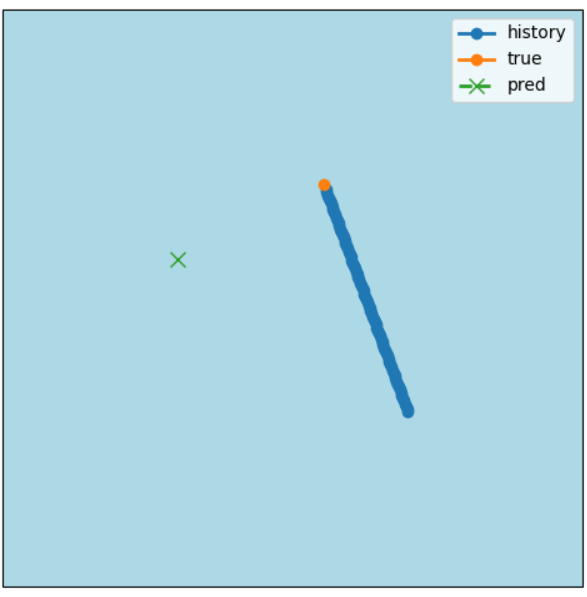
Finally, now that our model has been trained we use an evaluation function to check it in the different dataset we had stores earlier, as well as plot it on a map to see how the trajectory predictions look. Note- we dont just rely on the accuracy or training/testing results in numbers. There might be chances when the loss is showing in decimals but the coordinates are way far off. That is why we chose to plot it out on a map as well to check the predictions.

There are some debugging statements as well to see whether the scaling is right or wrong, the distace error etc. In this Model we have a metric distance error of only 800m.

Results

Predicted vs True (lat/lon)

t
lon_true
lon_pred
lat_true
lat_pred
Error (in m)

0

-61.69744

-61.70585

43.22816

43.22385

833.31 m

Summary (meters) t=0 mean error: 833.31 m mean over horizon: 833.31 m, median: 833.31 m

Last updated